Registration/bwForCluster/RV/Management
Roles in a RV
There are three different roles in an RV. Depending on your role, different management activites can be executed in the ZAS under My RVs. These are described below.
RV Coworker
A coworker is a typical user who registered themselves via RV acronym and RV password. They...
- ...can check the status of their memberships (active/inactive).
- ...can check the status of the RV (active/inactive & the date when it becomes inactive when it doesn't get prolonged).
- ...can deregister from an RV.
- ...have to acknowledge the cluster in publications and inform the RV responsible of these publications.
RV Manager
Additionally to the abilities of a coworker, a manager can...
- ...re-activate deregistered or inactive members.
- ...check the list of RV members at My RVs by selecting the RV acronym. After a role change, click Save changes at the end of the members list.
RV Responsible
Additionally to the abilities of a manager, the responsible can...
- ...assign managers.
- ...extend the runtime of the RV by one more year. Therefore, a list of publications that were created with the help of the cluster must be provided when submitting the prolongation form.
- ...change the RV responsible.
- ...set a new password if necessary and share the password with future coworkers so that they can join the RV.
Renew RV Password
If you lose the RV password or want to create a new one, you can simply renew it:
1. Login to My RVs first.

2. Select the RV acronym for your RV.
3. Scroll down and click Renew password.

You will get a form that looks similar to the form you got when registering the compute project. Most fields will be pre-filled with the things you entered when registering. Please check if the entered data is still accurate for your compute activity and adjust if necessary.
A new field in the form asks you to fill in the publications that acknowledge the cluster. Please enter the DOIs of those publications. These publications should all have the cluster you used in their Acknowledgement in a format as shown in the Acknowledgement section for each cluster.
Change the RV Responsible
Prerequisites:
- You need to be the current RV responsible. In case you don't have access to your account anymore, you can ask the cluster support for help.
- The person you want to appoint as new RV responsible is a member of the RV.
Steps:
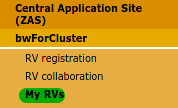
1. Login to My RVs and go to the RV.
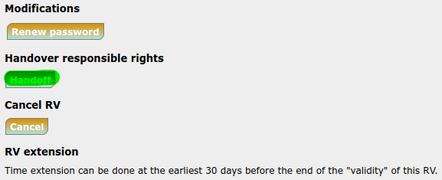
2. Scroll down and click Handoff.
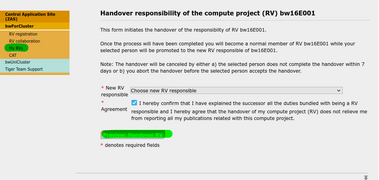
3. Select "New RV responsible" from the drop-down menu, check "Agreement" and click "Preview: Handover RV" to continue.
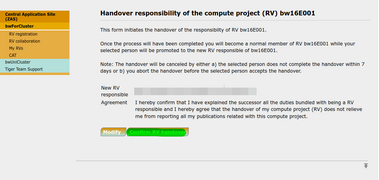
4. Confirm the handover.


5. The newly appointed RV responsible gets notified via email. They have to accept within seven days.
RV Extension
An RV is valid for one year. After that, the RV responsible must apply for an extension of the RV for it to be renewed for another year.
Hints for specific cases:
- I don't think that filling in the publication field is very important.
- → The bwHPC clusters can be used for free but it's very important for us to acquire funding for the next generation hardware, support services, data storage and infrastructure. To get funding, it's essential to provide a list of research publications that benefitted from the clusters. Furthermore, you've personally agreed to report publications in the process of registering for the cluster and you agreed to acknowledge them accordingly. Each cluster provides an example text for the acknowledgement.
- I'm late with the extension application and it would take some time to find out cluster related publications.
- → Write something like "I will provide them later" and send the list to your cluster's support unit as soon as you have them collected.
- We had a lot of publications but I'm not sure which ones made use of the cluster.
- → Please don't hand in the whole list but ask the RV members directly.
- We didn't have any cluster related publications.
- → We would appreciate a short note about the reason. Some examples: "We didn't need the cluster much", "The publication is still work in progress", "We'd appreciate some help for getting started with the cluster usage".
- We have only preprints so far.
- → You can report them already.
- The purpose and resource needs of the RV have changed.
- → While it won't change anything for you, we still appreciate it when the information get updated via the RV extension form.
- We forgot to acknowledge the cluster in most of the publications.
- → That's unfortunate but please report them nevertheless. You can save us the hassle of checking in detail when you provide us with an additional confirmation that the cluster was indeed used. For example "Some acknowledgements are missing but I confirm that the cluster usage was relevant for the publications nevertheless".
- I fear that the RV gets deactivated before the extension application gets accepted.
- → Depending on the cluster the access will still be possible for a while even if the RV is over its due date. But no new members can join while the extension is pending.
- We didn't use the RV for a long time but now that I want to hand in the RV extension, I don't see the button anymore.
- → Please write to the support. We can enable the button again for 14 days.
- Looking back I must say that we did some great research with the help of the cluster.
- We're happy to hear that and would love to show it off at our bwHPC website as success story. Don't hesitate to submit a short summary.